Notifications
The bell at the top of the app is where you catch up: your brief for the next round, then everything the app has told you.
The bell
The bell sits at the top of the app, next to the flag. A number on it is how many notifications you haven’t read. A dot with no number means a Major is waiting on your answer. Tap the bell to open NOTIFICATIONS.
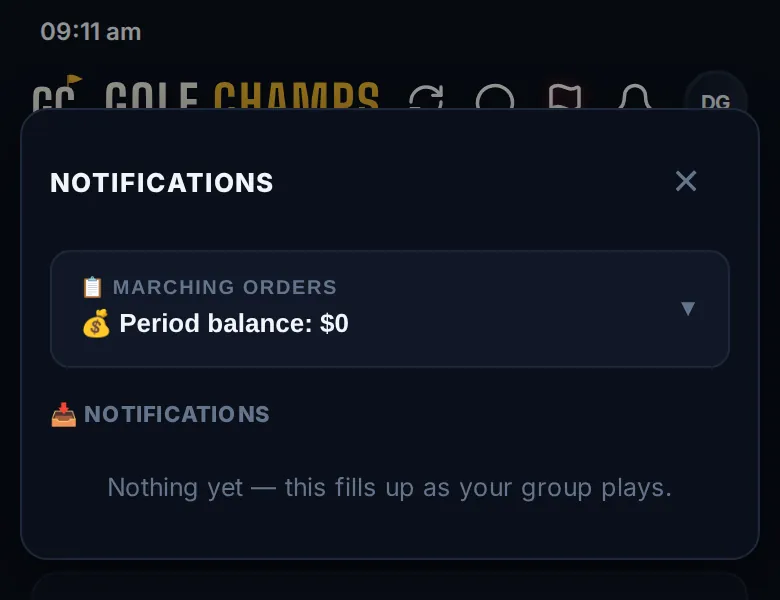
Marching Orders
📋 MARCHING ORDERS is your brief before the next round, worked out fresh from your own numbers. Tap it to open. Depending on your season it covers:
- Your period balance and how close you are to a beat or a trigger.
- Anything you owe the pot, and when it’s due.
- A Danger Zone warning, and how long the period has left.
- A streak about to start, and where you sit in the GC race.
- What’s still in the bag: your double for the period, mulligans and your Challenge Hole.
- Your Home Turf targets.
📣 Share to the group chat opens your phone’s share sheet so you can post it wherever your group chats. Marching Orders is hidden while you’re scoring a round, and there’s none on a Champ Day.
The list
📥 NOTIFICATIONS holds your notifications, newest first. It opens on Unread; tap All for the lot, or Mark all read. Tap one and it takes you to what it’s about: usually its card in the Home feed, with the thread open if it’s a comment, or Group Chat for a chat mention. If you’ve switched that email off, it still lands here, marked in-app only. An upcoming Major sits at the very top of the bell, above Marching Orders, with its countdown and I’m in.
Choose your emails
Open More, then Profile, then Notifications.
- The switch at the top turns every Golf Champs email off at once.
- Each category can follow the Group default, or be On or Off just for you. Your organiser sets the group defaults in Group Settings.
The categories: money (triggers, what you owe the pot and corrected rounds), Raids on you, Eagles, beats & blunders (this one also carries the email for every round, Double Flags, a mate going live and new bookings), Same-day games, Comments on your activity, When someone @mentions you, and Admin & pinned messages (announcements, polls and Majors). If several emails of the same kind land within a few minutes, you get the first and the rest wait in the bell, marked in-app only. Your organiser sets that window. Raids and round emails always send.
Good to know
Why didn't I get an email?
Check the category is on under Profile, then Notifications. Either way it’s in the bell, marked in-app only if the email didn’t go.
Does Marching Orders light up the bell?
No. The number only counts notifications you haven’t read.
Too many emails?
Switch off the categories you don’t need. Everything still shows in the bell, so you can catch up in the app.
Where do announcements show?
They email you under Admin & pinned messages and land in the bell. See Announcements.