Announcements
Announcements are notices from your group’s admin, kept in one place so nobody misses them.
Reading announcements
Open More → Announcements. The newest is at the top, with its title, who posted it, the date, the message and any picture. If there’s one you haven’t read, the menu row says how many. Tap an announcement to mark it read.
New announcements also land in Recent Activity, in the bell and in your email.

Must-read announcements
Some are marked MUST READ. When one is posted, it covers the app until you tap Got it. There’s no other way past it, so give it a read. If there’s more than one, they come one at a time, oldest first. If Got it doesn’t save, check your connection and tap it again.
Posting one (admins)
- Open More → Announcements and tap + New.
- Add a Title and a Message. Tap the camera to attach a picture.
- Tick Everyone must acknowledge this to make it must-read. Leave it off and it lands in the feed, the bell and an email without interrupting anyone.
- Tap Post announcement, or Post — everyone must acknowledge.
A must-read stops blocking the app after 14 days, or as soon as you archive it.
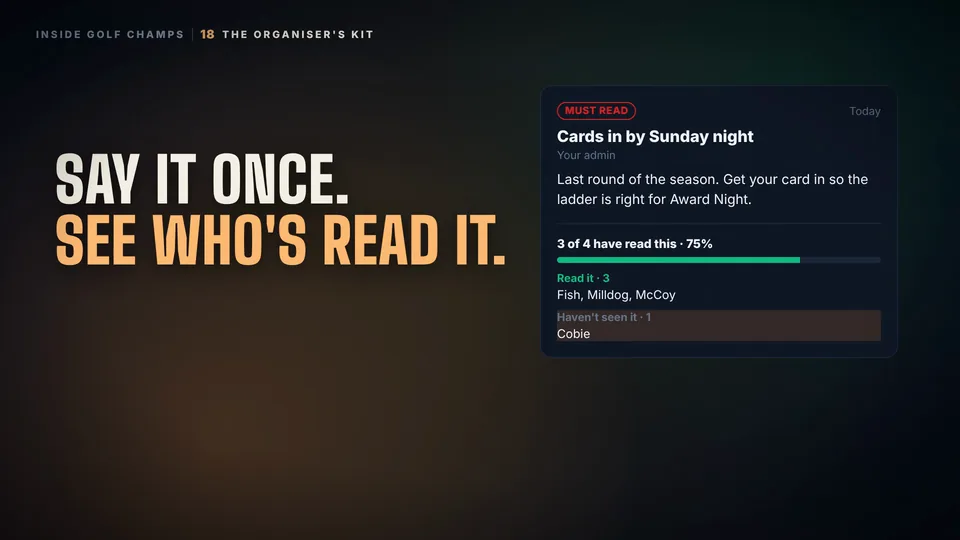
Who’s read it (admins)
On an announcement you posted, tap Who’s read it. You’ll see how many have read it, with names under Read it, Saw it, didn’t acknowledge and Haven’t seen it.
Archive takes it off everyone’s list and stops it blocking straight away. There’s no delete: the receipts are the record of who was told what.
Good to know
Can I close a must-read without reading it?
No. Got it is the only way past it, and your admin can see who has tapped it.
Does my admin know I’ve read it?
Yes. The admin who posted it can see that you opened it. For a must-read, they can also see when it was shown to you, even before you tap Got it.
Can I stop the emails?
Yes: Profile → Settings → Notifications → Admin & pinned messages. A must-read still appears in the app.
Who can post one?
Your group’s admins.
 Watch the 25-second filmThe Organiser’s KitBook the round, find a date, see who’s read the notice, and set your group’s rules. The organiser’s whole job, in one place.